What is the SharePoint file size limit?
The largest single file you can upload to a SharePoint document library is 250 GB. A file attached to a SharePoint list item can be only 250 MB.
Which limit applies to your file?
| Where the file goes | Limit | What it covers |
|---|---|---|
| Document library, Teams Files tab, OneDrive | 250 GB per file | One uploaded file |
| SharePoint list or Microsoft Lists item | 250 MB per attachment | One attached file |
| Download of several files at once | 20 GB | The ZIP that SharePoint builds |
| Folder path plus file name | 400 characters | The full decoded path |
Microsoft lists these limits for every Microsoft 365 plan, so a Business Basic site has the same file limit as an Enterprise site.
Why does an upload fail under the limit?
- The path is too long. The folder path and the file name together can reach only 400 characters after decoding.
- The organization is out of space. Microsoft warns that sites then go read-only, and no upload works.
- The file is going to a list as an attachment. A 300 MB video fails there even though a library accepts it.
How do you store a file that is too big for a list?
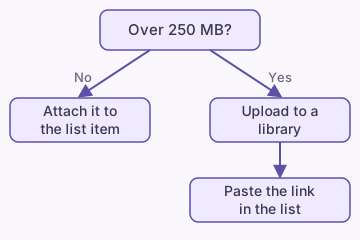
- Create or open a document library on the same site.
- Upload the large file to the library.
- Open the file's menu and select Copy link.
- On the list, add a Hyperlink column if it has none.
- Paste the link into that column on the list item.
The list then holds a link, and the library holds the file. Our guide on where list attachments go explains how attachments are stored.
Do large files count against your storage?
Yes. Every file counts toward the tenant total of 1 TB plus 10 GB for each license. The site Recycle Bin counts too, so empty it after a large delete. See how much storage SharePoint has for the full math.
Will a huge library still sync?
Tip: Microsoft recommends syncing no more than 300,000 files from a single library.
A file can pass the upload limit and still make sync slow. If the sync button is missing or stuck, read the sync button guide.
What should you check before a big upload?
- File is under 250 GB (library) or 250 MB (list).
- Folder path plus name is under 400 characters.
- Tenant has free storage left.
- You upload to a library, not a list attachment.
What if the attachment is simply not showing?
A missing attachment is a different problem from a size limit. Follow the attachments not showing guide.