How much storage does SharePoint have in Microsoft 365?
Your organization gets 1 TB plus 10 GB for each eligible license you buy. A single site can hold up to 25 TB, and the Recycle Bin counts toward the total.
How do you work out your total?
Total storage = 1 TB + (10 GB x number of licenses)

20 licenses: 1 TB + 200 GB = about 1.2 TB
100 licenses: 1 TB + 1,000 GB = about 2 TB
The base is 1 TB for the whole organization. Each license adds 10 GB. SharePoint counts in binary gigabytes, where 1 GB equals 2^30 bytes, so a few numbers may look slightly different from a decimal count.
What are the other limits to know?
| Limit | Value |
|---|---|
| Storage for the whole organization | 1 TB plus 10 GB per license |
| Largest single site | 25 TB |
| Largest single file you can upload | 250 GB |
| File attached to a list item | 250 MB |
| Sites per organization | 2 million |
The 25 TB cap applies to each site. Your organization total is the limit you reach first.
What counts toward your storage?
- Files in document libraries on every SharePoint and Teams site.
- Items in each site's Recycle Bin. Microsoft counts that space toward the organization total.
- Version history, because each saved version takes space.
- Not counted: data moved to Microsoft 365 Archive, which is billed apart from your active quota.
- Not counted: the OneDrive made for each licensed user.
How do you check what you have used?
- Sign in to the SharePoint admin center as a SharePoint administrator.
- Open Active sites.
- Read the storage used and available in the upper right of the page.
- Sort the list by Storage used to find the largest sites.
What do you do when you run out?
- Empty the Recycle Bin on the biggest sites. Its space counts toward your limit.
- Trim old file versions on large libraries. See version history for lists and libraries.
- Move old files to another store, or delete files nobody needs.
- Buy Microsoft 365 Extra File Storage. A Global Administrator can add it, and there is no cap on how much you buy.
Tip: Deleting a file does not free space until it also leaves the Recycle Bin.
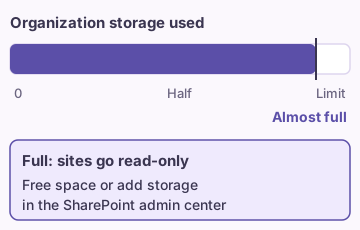
When the organization total is full, Microsoft warns admins that sites go read-only and changes can't be saved. Free space or add more before that point.
Is more space the right fix?
Often the cause is old versions and stray copies. Clean up first. A clear folder plan and owner for each site stops the waste from coming back. See document management best practices and permissions best practices.
If you deleted something by mistake while cleaning, read how to restore a deleted item.
FAQ
Sources
- SharePoint limits (Microsoft Learn)
- Out of storage in SharePoint (Microsoft Learn)
- Manage site storage limits in SharePoint (Microsoft Learn)