SharePoint consulting services: what to know before you hire
A SharePoint consultant builds the lists, pages, permissions and automations that your team uses every day. Before you hire, ask what they build, who owns it afterward, and what the first call covers.
What does a SharePoint consultant do?
A consultant turns a repeated team task into a tool inside Microsoft 365. The tool can be a SharePoint list that tracks work, a page that shows status, or a Power Automate flow that sends a Teams message when a step is late.
Al Davies builds tools that cut busywork and missed steps for teams. The work centers on SharePoint, Power Automate and Teams automation.
Which jobs fit a consultant?
See three finished examples on the reports case study, the onboarding case study and the restaurant case study.
| Your problem | What gets built | What your team sees |
|---|---|---|
| Steps get missed in email threads | A SharePoint tracker with an owner for each step | One list that shows what is open and who holds it |
| People retype the same data | A list that stores each item once | Fewer repeated entries |
| Late work surfaces only when someone complains | A Power Automate flow that sends a Teams alert | A message in a channel before the deadline passes |
| Nobody knows who can open a file | A permission plan for the site | Clear groups and fewer surprise shares |
What should you ask before you hire?
A good answer names a specific tool and a specific result. A weak answer lists every Microsoft product and promises all of them.
- Ask who will build the work and who will answer your questions.
- Ask which tools the work uses. Your team should already own them.
- Ask whether you get the lists and flows in your own tenant, not in the consultant's account.
- Ask how the consultant documents each flow so your team can read it later.
- Ask what happens when a flow fails or a person leaves your team.
- Ask for a finished example that matches your problem.
Which red flags should you watch for?
Watch for a plan that starts with a large platform when your team needs one tracker. Watch for work that lives only in the consultant's account. Watch for a promise to fix everything before anyone has seen your process.
Tip: If a proposal lists features but never names the repeated task it removes, ask what task it removes.
What does a first call cover?
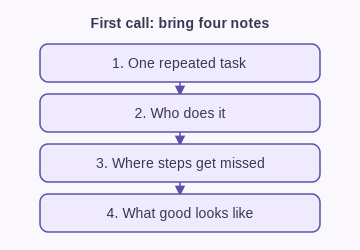
The first call is free and takes 45 minutes. Bring one thing your team repeats every week. The call is the place to describe the task, name the people involved and say where steps get missed.
Al Davies replies himself within one business day. You can also email al@250highstreet.com.
How do you prepare for the call?
Write four lines like these before you talk. Short notes about one task give the consultant more to work with than a long list of wishes.
Task: new partner onboarding.

Who does it: two people in operations.

Where it lives now: email and Word files.

What goes wrong: a step gets skipped and nobody notices.

What good looks like: no step closes until its owner confirms it.
What should you check on the Microsoft side first?
Some flows use connectors that need a paid license. Read the HTTP premium connector license guide before you agree to a design that calls an outside service.
Permissions also shape the build. Read SharePoint permissions best practices so you can describe who needs access to what.
Is a consultant better than doing it yourself?
Your own team can build a simple list. A consultant helps when the process crosses several people, needs rules for who may do what, or needs an alert when a step stalls. Read how to replace a spreadsheet with a SharePoint list to judge which side you are on.
FAQ
What are SharePoint consulting services?
They are paid help to design and build tools in SharePoint, such as trackers, pages and Power Automate flows, so a team repeats fewer manual steps.
What is the difference between a SharePoint consultant and a SharePoint developer?
A consultant starts from your process and decides what to build. A developer writes the code for a chosen design. Many small projects need only the first role.
What should I bring to a first call?
Bring one task your team repeats every week, who does it, and where steps get missed. Short notes are enough.
Does a consultant need access to my whole Microsoft 365 tenant?
No. Ask for the smallest access that covers the site or list in scope, and remove it when the work ends.
How do I know a flow will keep working after the consultant leaves?
Ask for flows in your own tenant, owned by a named person on your team, with each step written down in plain words.