SharePoint project tracker examples, with a live demo
Short answer: a good SharePoint project tracker is one list where every row has an owner, priority, status and target date. Views filter it per person or team, and color rules flag items that sit too long. Below are three trackers I built for one parcel logistics company, each shown with made-up data, and one you can open right now.
At a glance
Swipe sideways to see all columns.
| Item | Number | What it means for you |
|---|---|---|
| Items in one list | 30 million | A tracker will not run out of room. Your view limit comes first. |
| Items a view can process | 5,000 | Microsoft calls this the list view threshold. Filtered views keep you under it. |
| File attached to a list item | 250 MB | Attach one file up to 250 MB to each tracker row. |
| Lookup-style columns in one view | 12 | Lookup, Person and workflow status columns each count. Keep views light. |
| Unique permissions in one list | 50,000 (5,000 advised) | Giving single rows their own access list slows the tracker. Use few. |
Open the live Delayed Shipments demo
Every customer, tracking number and date in it is invented. No sign-in needed.
Example 1: Team Tracker (one list, four tracks)
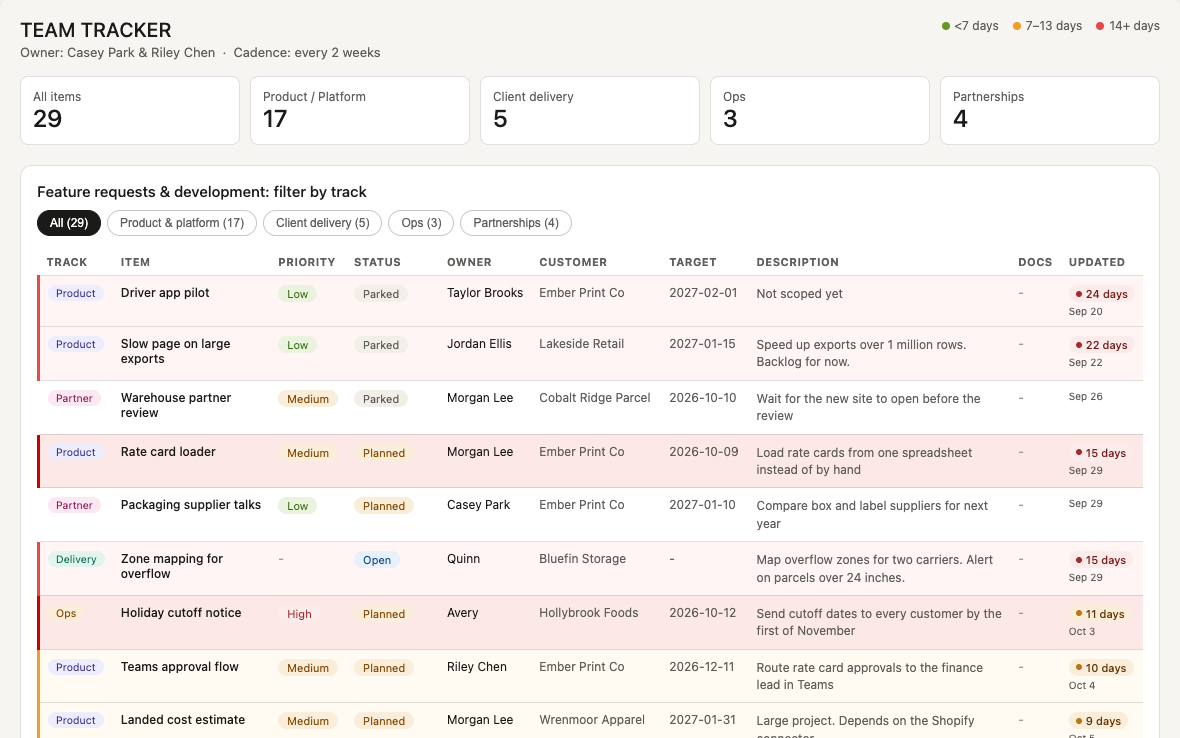
Before: feature requests from a standing meeting lived in loose spreadsheets and emails.
After: one tracker that grew into four tracks: product, delivery, ops and partnerships. Everyone sees the same list. It was later rolled out to more people, and it now tracks partnerships and other live work, not just development.
- Every item has: an owner, priority, status and target date. Files can be attached.
- Statuses: 6.
- Age rule: items turn amber after 7 days and red after 14. Overdue dates show in red.
- Views: filter by track, search, sort.
Copy this when several teams share one to-do list and argue about it.
Example 2: Delayed Shipments (two trackers, checked every morning)
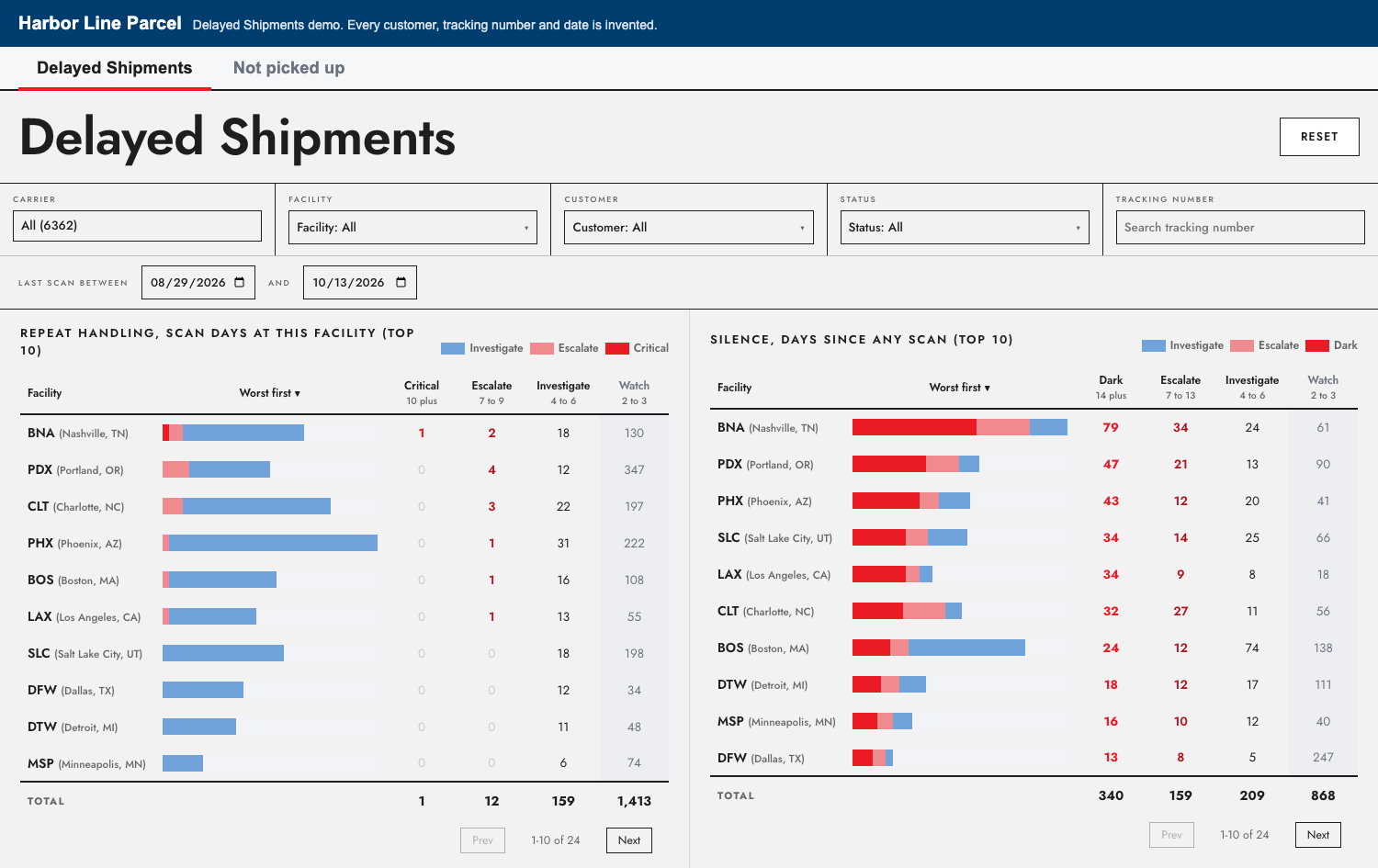
Before: ops found stuck parcels when customers called.
After: every morning, two trackers flag delays: one at the carrier, one at the warehouse. Worst first.
Open the live demo.
Copy this when the problem is "we hear about it too late."
Example 3: Client Onboarding (seven phases, gated)
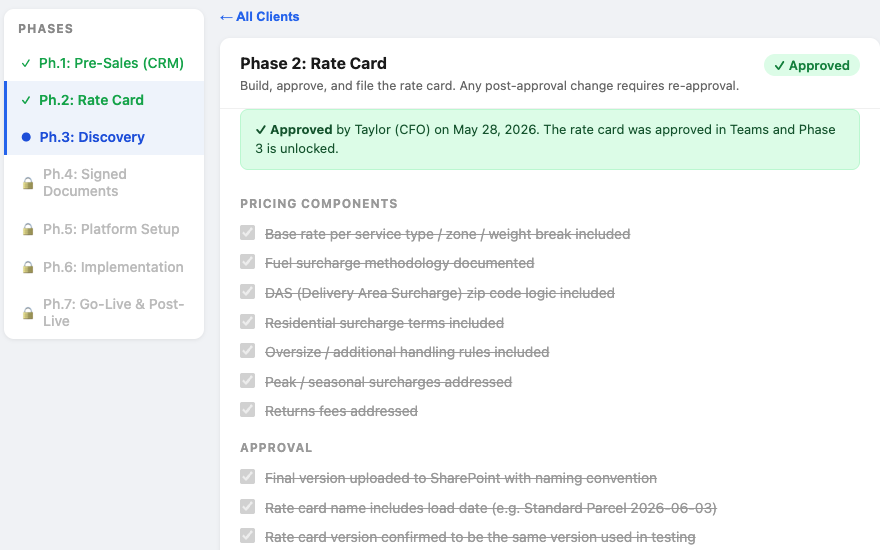
Before: each new customer lived in email threads, and steps got missed.
After: seven phases per customer, each with a named owner. A phase cannot close until its checks pass.
- Rate card approvals go to one approver as a Teams card. Approve or Reject, and the record updates.
- A built-in tester runs six API checks and saves the results for each customer.
- The discovery call form makes a branded PDF and saves it to the customer record.
Copy this when a process has fixed steps and people skip them.
A fourth tool, a Sales Volume report, is on the portfolio page.
Build your own: a starter column list
Swipe sideways to see all columns.
| Column | Type | Why |
|---|---|---|
| Title | Single line of text | What the item is |
| Owner | Person | One name per row, so nothing belongs to "everyone" |
| Priority | Choice | Sort the list in a meeting |
| Status | Choice | Keep it short. The Team Tracker uses 6. |
| Target date | Date | Drives the red "overdue" rule |
| Track | Choice | Add it when more than one team shares the list |
Limits to plan for
- A list can hold up to 30 million items.
- A view that shows more than 5,000 items hits the list view threshold. Filter views by status, owner or track to stay under it.
- Once a list has more than 100,000 items, you cannot break permission inheritance on the whole list.
When to get help
Build the list yourself if it is one team and one process. Get help when you need flows, approvals in Teams, or two trackers that share data.
I am Al Davies, 250 High Street, Berkeley Heights, NJ. I work remotely with teams of 20 to 300 people.
- Free 45-minute call. Your team shows me how you track the work today.
- Free preview in 3 to 5 days. I send images of a potential tracker.
- Say yes, and I build it. One tracker: $5,000, 2 weeks. Two: $8,500, 3 weeks, the best fit for most teams. Three: $11,500, 4 weeks.
Or write to al@250highstreet.com or call (862) 205-4844.
FAQ
Updated 2026-10-27.
What columns should a SharePoint project tracker have?
Start with title, owner, priority, status and target date. Add a track column when more than one team shares the list.
How many items can a SharePoint list hold?
Up to 30 million. Keep each view under 5,000 items to avoid the list view threshold.
Can a SharePoint tracker flag old items on its own?
Yes. View formatting can color items by age, and a scheduled Power Automate flow can send reminders. The Team Tracker turns items amber after 7 days and red after 14.
Is there a live demo?
Yes. The Delayed Shipments demo runs in your browser with made-up data. No sign-in needed.
Sources
- 250 High Street portfolio: https://250highstreet.com/portfolio/
- Microsoft Learn, SharePoint limits (30 million items; 100,000-item permission rule): https://learn.microsoft.com/en-us/office365/servicedescriptions/sharepoint-online-service-description/sharepoint-online-limits
- Microsoft Support, Manage large lists and libraries (5,000 list view threshold): https://support.microsoft.com/en-us/office/manage-large-lists-and-libraries-b8588dae-9387-48c2-9248-c24122f07c59
- Microsoft Support, List View Threshold for large lists and libraries