How to get the current date and time in your time zone in Power Automate
Use utcNow() to get the current time, then wrap it in convertFromUtc() with your time zone name, such as convertFromUtc(utcNow(), 'Eastern Standard Time', 'yyyy-MM-dd HH:mm'). utcNow() alone always returns UTC, not local time.
What is the one expression to copy?
convertFromUtc(utcNow(), 'Eastern Standard Time', 'MM/dd/yyyy hh:mm tt')
Add a Compose action, open the Expression tab, paste the line above, and select OK. Change the time zone name to match your office. The output is text, such as 10/31/2026 03:11 AM.
How do you build it step by step?
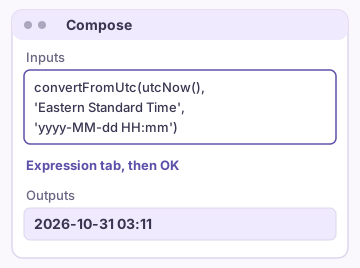
- Select + (Insert a new step), then Add an action, and search for Compose. In the classic designer, select New step.
- Select the Inputs box, then select the fx button (Insert expression) or the Expression tab.
- Type utcNow() and select OK to see the UTC time.
- Edit the expression to wrap it: convertFromUtc(utcNow(), 'Your Time Zone Name').
- Add a format as the third part if you want only the date, such as 'yyyy-MM-dd'.
- Save the flow and run a test.
Why is the time wrong by several hours?
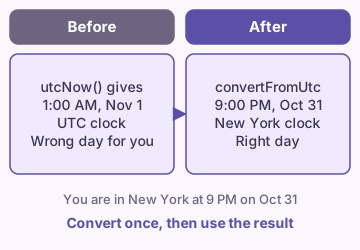
Microsoft documents that utcNow() returns the current timestamp in Coordinated Universal Time. A flow that runs at 9 PM in New York can show tomorrow's date, because UTC is already past midnight.
Convert the value before you use it in an email, a file name, or a date column. If a date is already wrong in a list or an email, our wrong day or time guide covers that fix.
Tip: Convert once in a Compose action, then reuse its output everywhere else.
Which function fits which job?
| Function | What it returns | Example use |
|---|---|---|
| utcNow() | The current time in UTC | Store a timestamp |
| utcNow('yyyy-MM-dd') | Today's UTC date as text | A file name |
| convertFromUtc(utcNow(), 'Eastern Standard Time') | The current time in one time zone | An email body |
| getFutureTime(7, 'Day') | UTC time seven days from now | A due date |
| getPastTime(1, 'Day') | UTC time one day ago | A yesterday filter |
| startOfDay(utcNow()) | Midnight UTC today | A date-only compare |
What are the common format codes?
- yyyy-MM-dd gives 2026-10-31.
- hh:mm tt gives a 12-hour time with AM or PM.
- Capital MM means month. Small mm means minutes.
The formatDateTime guide has the full list of format strings Microsoft shows.
What are the time zone names?
convertFromUtc() uses the Windows time zone names, not city names. Microsoft publishes the full list on its Default Time Zones page.
Common names for US offices are Eastern Standard Time, Central Standard Time, Mountain Standard Time, and Pacific Standard Time. Each name already includes daylight saving changes, so you do not switch names in summer.
| Works | Fails |
|---|---|
'Eastern Standard Time' | 'EST' |
'Pacific Standard Time' | 'America/New_York' |
'GMT Standard Time' | 'New York' |
How do you get yesterday, tomorrow, or next week?
Use getPastTime() and getFutureTime() with a number and a unit, then wrap the result in convertFromUtc(). For a date only, add a format at the end.
To add days to a date you already hold, see Add days to a date. To skip weekends, see Add business days to a date.
convertFromUtc(getFutureTime(7, 'Day'), 'Eastern Standard Time', 'yyyy-MM-dd')
What do you do with the result?
- Count the days to a deadline with days between two dates.
- Find the weekday with day of week from a date.
- Find the month start and end with first and last day of month.
FAQ
Does Power Automate have a local time function?
No. The expression language has utcNow() only. Use convertFromUtc() or convertTimeZone() to change the result into your time zone.
Does daylight saving time need a manual change?
No. A Windows time zone name such as Eastern Standard Time follows the daylight saving rules for that region.
Should I store the time in a variable?
Use a Compose action for a value you set once. See the Compose versus variable guide.
Sources
- Reference guide to workflow expression functions (Microsoft Learn)
- Default time zones (Microsoft Learn)
- Use expressions in conditions in Power Automate (Microsoft Learn)
Related guides
- Power Automate date shows wrong day or time
- Power Automate: Add Days to a Date With addDays()
- Add days or business days to a date in Power Automate
- Power Automate: Days Between Two Dates (dateDifference and ticks)
- Power Automate: Get the Day of the Week From a Date (dayOfWeek)
- Power Automate: First and Last Day of the Month
- Power Automate Compose vs Variable: Which One to Use