How to append to an array variable in Power Automate
Add an Initialize variable action with type Array, then add an Append to array variable action where you want to add an item. Each run of the Append action adds one value to the end of the list.
How do you set up the array?
How do you add an item inside a loop?
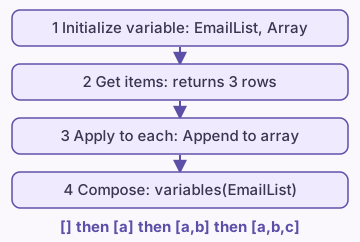
Place the Append to array variable action inside an Apply to each loop. In the Name box, pick the array you created. In the Value box, pick the dynamic content for one item, such as the Email of the current row.
After the loop ends, the variable holds one entry per row. Read the whole list with variables('EmailList') in any later action.
Where must the Initialize variable action go?
Microsoft documents that you create a variable with the Initialize variable action, and that you can declare variables only at the top level of the flow, not in scopes, conditions or loops. Put Initialize variable before any condition, scope or loop.
If you try to add it inside one of those blocks, the designer does not offer the action. Move it above the block.
Which variable action fits which job?
Can you append an object, not just text?
Yes. An array can hold objects. In the Value box of Append to array variable, switch to the Expression tab and write json('{"name":"Ann","qty":2}'). To use dynamic content, write the object with the Compose action first and pick its output.
Use the same shape for every item. A mixed list is hard to use in later steps.
Why does the list come out in a random order?
Apply to each can run several rows at the same time when concurrency is on. The Append actions then run in no fixed order, so the list order changes from run to run. Microsoft's fix is to turn on Concurrency control in the loop settings and set the degree of parallelism to 1. See Apply to each concurrency for the steps.
If you do not need a running list at all, a Select action builds a list from a table in one step and avoids the loop.
What do you do with the finished array?
- Count the items with length(variables('EmailList')).
- Keep only some items with a Filter array action.
- Turn the list into one line of text with a Join action.
- Turn a list of objects into a file with Create CSV table.
FAQ
Can I append to an array that is not a variable?
No. The Append action works only on a variable. To join two arrays without a variable, use the union() expression in a Compose action. union() also drops duplicate items.
Why does Append to array variable show an error about the type?
The variable was not created with type Array. Change the Type in the Initialize variable action to Array.
Should I use a variable or a Compose action?
Use a variable when the value changes during the run. Use Compose for a value you set once. See the Compose versus variable guide.
Sources
- Use variables to store, manage, and manipulate data in flows (Microsoft Learn)
- Reference guide to workflow expression functions (Microsoft Learn)
- Create variables to store and manage values (Microsoft Learn, Azure Logic Apps)
Related guides
- Speed up Apply to each with concurrency control
- Power Automate Select Action: Reshape an Array
- Power Automate Filter Array: Steps and Examples
- Power Automate Join Action: Array to Text String
- Power Automate: Create CSV Table From a SharePoint List
- Power Automate Compose vs Variable: Which One to Use