How to add leading zeros to a number in Power Automate
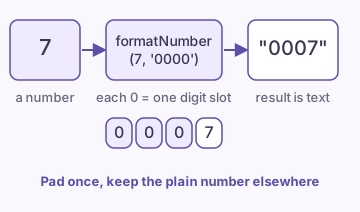
Use formatNumber() with a string of zeros as the format. For example, formatNumber(7, '0000') returns the text "0007". If the value is already text, such as a ZIP code, join zeros in front with concat() and cut the result with substring().
How do you pad a number with zeros?
- Below the step that holds the number, add a Compose action.
- Click inside the Inputs box and switch to its Expression tab.
- Enter formatNumber(triggerBody()?['TicketNumber'], '00000'). Swap in your own value for the trigger output.
- Choose Add (OK in the classic designer), then save and run the flow.
- Open the run history. The Compose output shows the number padded to five digits.
Each 0 in the format is a placeholder for one digit. A number with fewer digits gets zeros on the left. A number with more digits is not cut.
What does the result look like?
formatNumber(7, '0000') returns "0007"
formatNumber(48, '0000') returns "0048"
formatNumber(12345, '0000') returns "12345"
Ticket ID: concat('TKT-', formatNumber(48, '00000')) returns "TKT-00048"
Why does the result become text?
The formatNumber() function returns a string. Microsoft documents it as formatNumber(number, format, locale?), and it relies on number.ToString(format, locale). A string such as "0007" cannot keep its zeros as a number, because a number has no leading zeros.
Do any math on the raw number first. Add 1 to the last ticket number, then pad the result in the last step, where you build the ID or the message.
Tip: Keep the original number in a variable or a column. Pad only for display.
How do you pad a value that is already text?
The formatNumber() function expects a number. A ZIP code or an employee code that starts with 0 often arrives as text. Convert digits-only text with int() first, as shown in convert text to a number, or pad it with text functions.
| Starting value | Method | Expression |
|---|---|---|
| Number, such as 48 | formatNumber() | formatNumber(48, '0000') |
| Text, such as "48" | formatNumber() after int() | formatNumber(int('48'), '0000') |
| Text with letters, such as "A48" | concat() and substring() | substring(concat('0000', 'A48'), length('A48'), 4) |
How does the concat and substring method work?
Join a string of zeros to the front of the value. Then keep only the last characters. To make the result four characters long, join '0000' to the value and read four characters that start at the length of the value.
In general, substring(concat('0000', value), length(value), 4) keeps the right four characters. If the value has more than four characters, the call cuts off its left side, so check the length first.
| formatNumber() | concat() and substring() |
|---|---|
Short, one function | Works on any text |
Needs a real number | Longer expression |
Longer values stay whole | Cuts values longer than the pad |
Which mistakes drop or break the zeros?
- Comparing the padded text with a number in a Condition. Text and numbers do not compare or sort the same way.
- Typing a different count of zeros than the width you want. '000' gives 007, not 0007.
- Passing an empty column to formatNumber(). See the null error guide below.
- Saving the padded value to a SharePoint Number column. SharePoint drops the zeros, so use a Single line of text column.
For the null error, see the invalid type, expected string but got null error.
Where do you use padded numbers?
Common uses are invoice numbers, ticket IDs and file names that must sort in order. A file named Invoice-0009 sorts before Invoice-0010. A file named Invoice-9 sorts after Invoice-10 in many lists.
For a full numbering flow that reads the last ID and adds one, see how to auto-number ticket IDs in a SharePoint list. To join the pieces of the ID, see how to join text with concat(). For amounts with commas and decimals, see formatNumber as currency.
FAQ
Is there a padLeft function in Power Automate?
No. The expression reference lists no padLeft function. Use formatNumber() with zeros, or concat() with substring().
Can I add zeros to a number in a SharePoint Number column?
A Number column does not keep leading zeros. Store the padded value in a Single line of text column.
Does formatNumber() cut a number that is too long?
No. formatNumber(12345, '0000') returns "12345". The zeros set a minimum width.
How do I turn "0007" back into a number?
Use int('0007'). The result is 7. The zeros are dropped.
Sources
- Reference guide to workflow expression functions (Microsoft Learn)
- Custom numeric format strings (Microsoft Learn)