How many versions of a file does SharePoint keep?
A SharePoint document library keeps up to 500 versions of each file. Your library may use the automatic setting, a lower count, or a time limit instead.
Which version limit does your library use?
| Setting | What SharePoint does | Best for |
|---|---|---|
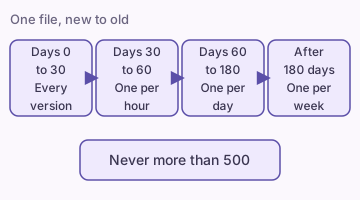
| Automatic | Keeps every recent version, then thins out older in-between versions as files age, up to 500 | Most libraries |
| Manual, count limit | Keeps no more than the count you set, for example 500 versions per file | A fixed number of versions to restore |
| Manual, count and time limit | Keeps no more than the count, and deletes any version older than the days you set, for example 365 | The lowest storage use |
Microsoft recommends the automatic setting. It keeps the versions people restore most while it saves storage. The screen will not accept fewer than 100 versions or fewer than 30 days.
How do you see the setting for your library?
- Open the document library.
- Select the gear icon, then Library settings. If a panel opens, select More library settings.
- Select Versioning settings.
- Read the version limit options on that page.
- Close the page without a change if you only wanted to look.
Site owners can change the limit for a library they own. Admins set the default for new libraries across the organization.
What happens when a file passes the limit?
Limit: 500 versions, 365 days.
A file has 500 versions. You save a new one.
SharePoint deletes the oldest version to make room.
A version older than 365 days is also deleted, even if the count is below 500.
Versions removed by a limit are deleted for good. They skip the Recycle Bin, so you cannot restore them. A file under a retention policy or legal hold keeps its versions until the hold ends.
Do old versions use your storage?
Yes. Stored versions count toward your organization's storage, so a file with many versions uses more space than one with few. Microsoft found the automatic setting cut version storage by about 94% in one test, compared with a count limit alone.
Deleted versions are not a backup. Read how to back up a SharePoint list if you also need a copy of list data.
Is this the same as list version history?
Tip: Libraries and lists keep version history in two separate places, and each has its own settings.
If a list item shows no history, follow the version history not showing guide. For a workbook, see Excel Online version history.
What if you need a deleted item back?
Version limits cover older copies of a file. A deleted item sits in the Recycle Bin instead. See how to restore a deleted list item.
What should you check before you lower the limit?
- You know how far back your team needs to restore a file.
- No rule or contract requires you to keep older versions.
- You told the people who use the library.
- You noted the old setting so that you can reverse the change.
If you lower the count, SharePoint does not delete the extra versions at once. It removes up to 20 old versions each time someone saves the file. A new time limit applies only to versions saved after the change.
FAQ
Sources
- Overview of version history limits for document libraries and OneDrive (Microsoft Learn)
- Plan version storage for document libraries (Microsoft Learn)
- Set version limits for a document library (Microsoft Learn)
- Enable and configure versioning for a list or library (Microsoft Support)